
Shopify Review: The Best Website Builder for E-Commerce

Editors’ Note: Shopify offers extensive e-commerce features, including an advanced checkout function, inventory management tools and automated sales tax calculation. Shopify also has some of the best server performance in the industry — including the fastest site speed of any host I’ve tested — and robust security protocols to protect your website, account and information.
Shopify is arguably the most well-known e-commerce store builder, powering millions of stores — but does it deserve its fame?
I built a Shopify website and tested it to determine its ease of use, performance and customer service. Shopify impressed me at almost every turn, proving that it is, in fact, one of the best website builders in existence and definitely the best option for e-commerce sites.
Shopify plans and pricing: At a glance
Shopify uses cloud hosting, which stores website data in a series of interconnected servers in multiple geographical locations. This kind of web hosting ensures near-continuous uptime, as your site can pull from a secondary server if the primary server goes down. Cloud hosting is also easy to scale, as your site can pull storage and bandwidth from additional servers as needed, meaning it — and therefore Shopify — are equipped to handle the changing needs of large online stores.
All Shopify plans provide full access to its e-commerce store builder. This visual design tool makes it easy to create your website, including product pages and a fully featured checkout page. You’ll also get Shopify’s email marketing tools, including abandoned cart recovery and automated email campaigns. This is especially great if you don’t already have email marketing systems in place, but it’s not just for newbies — you can save money and time by switching to Shopify instead of keeping an external service.
Additionally, bandwidth and storage are unlimited on all Shopify plans, so it can scale alongside your site’s traffic.
Shopify also offers shipping discounts for USPS, DHL Express and UPS. These shipping discounts can go up to 88% and save you thousands of dollars as your site grows.
The big differences between plans are transaction rates, shipping discounts and staff accounts. Here’s how Shopify plans compare:
| Plan name | Credit card transaction rates | Shipping discounts | Staff accounts | Price |
| Basic | 2.9% + $0.30 USD for online purchases; 2.6% + $0.10 USD for in-person purchases | Up to 77% | One | $29 a month, billed annually |
| Shopify | 2.7% + $0.30 USD for online purchases; 2.5% + $0.10 USD for in-person purchases | Up to 88% | Six | $79 a month, billed annually |
| Advanced | 2.5% + $0.30 USD for online purchases; 2.4% + $0.10USD for in-person purchases | Up to 88% | Sixteen | $299 a month, billed annually |
Build Your Store with Shopify®
Shopify charges transaction fees, which vary by plan
Transaction fees are charged to your customers’ cards when they make a purchase. They aren’t added to your hosting fees, but can cost you a lot of money over time. To avoid these losses, calculate how much individual transaction fees will set you back and include those costs in your prices. You can also keep more of your profits if you switch to a plan with reduced transaction fees as your store grows.
The rates listed here are based on credit card payments processed by Shopify’s proprietary payment system. There are additional transaction fees for third-party systems, starting at 2%.
Shopify Plus
Shopify offers Shopify Plus for enterprise businesses. These plans are customized to individual business’s needs and provide more site customization, inventory locations and unlimited staff accounts. Shopify Plus starts at $2,300 a month.
Shopify templates let you quickly start your online store
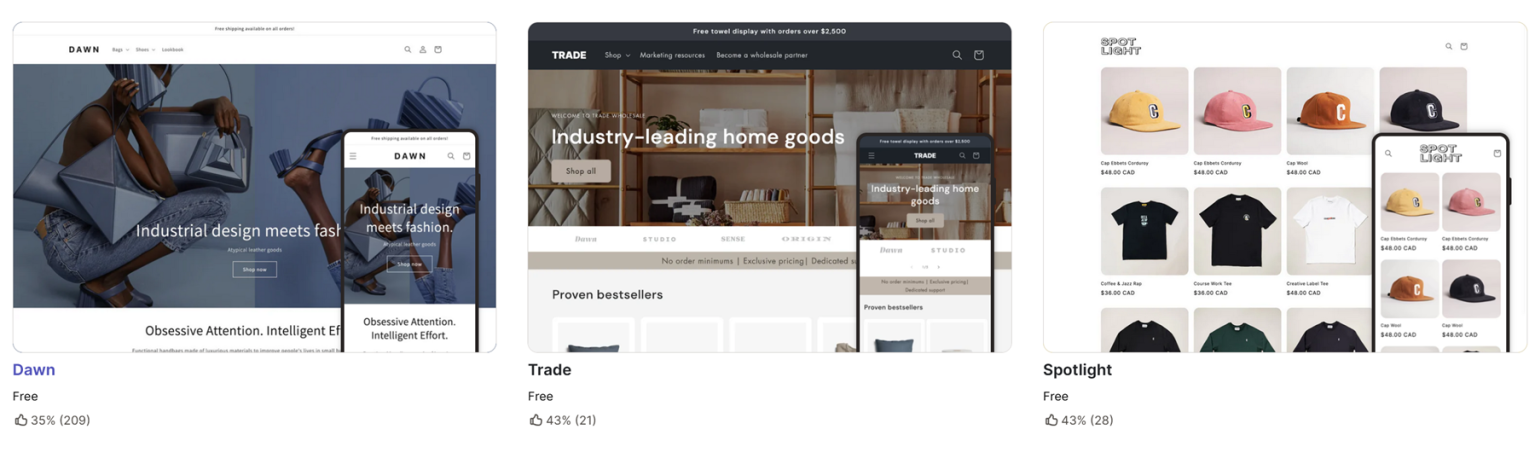
Shopify has 13 free templates, the smallest number of no-cost templates available from any website builder I’ve tested. The templates are attractive and use responsive design, making them mobile-friendly, but I’m still disappointed with this lack of selection.
If you want to make your store stand out, you’ll need to heavily modify one of these free templates or buy one of Shopify’s 220 premium templates. Most of these templates are specialized for niches like high fashion and tech. They typically cost between $200 and $500. This is a relatively low cost for many e-commerce stores, but it can be prohibitively expensive if you’ve got a small startup budget.

Shopify AI lets you create a custom website theme
Shopify offers a suite of AI tools called “Shopify Magic”. You can use the first of these tools to generate sample themes based on the name of your business. I like that it creates three themes for you to choose from, and the themes themselves are attractive. However, it took a few tries to get a theme relevant to the industry I selected, and adding more detail actually resulted in less relevant themes.

An interesting thing about this system is that these images are just samples; Shopify generates the full theme once you’ve decided to try it. This takes a couple of minutes and builds your homepage, catalog and contact page. I liked the template it built me, though I still prefer the collaborative process of the Squarespace AI builder.
Build Your Store with Shopify®

Shopify ease of use: Intuitive for daily tasks after onboarding
I built an e-commerce store with Shopify to test it for ease of use in three areas: the purchase process, account management and store setup. I had some misgivings during the first part of the process, but once I figured out where to find things I realized Shopify’s tools are some of the best in the business.
Purchase process
Creating a Shopify account takes just a few seconds. From there, you’ll be asked some questions about where you want to sell your products and what you’ll be selling. This information doesn’t have a notable impact on the setup process, so you can skip these questions if you don’t want to share that information.
The next step in the signup process is to choose your plan. You’ll get free access to this plan for three days, followed by one month at $1. You’ll also see that the prices listed here are those for a month-to-month plan.
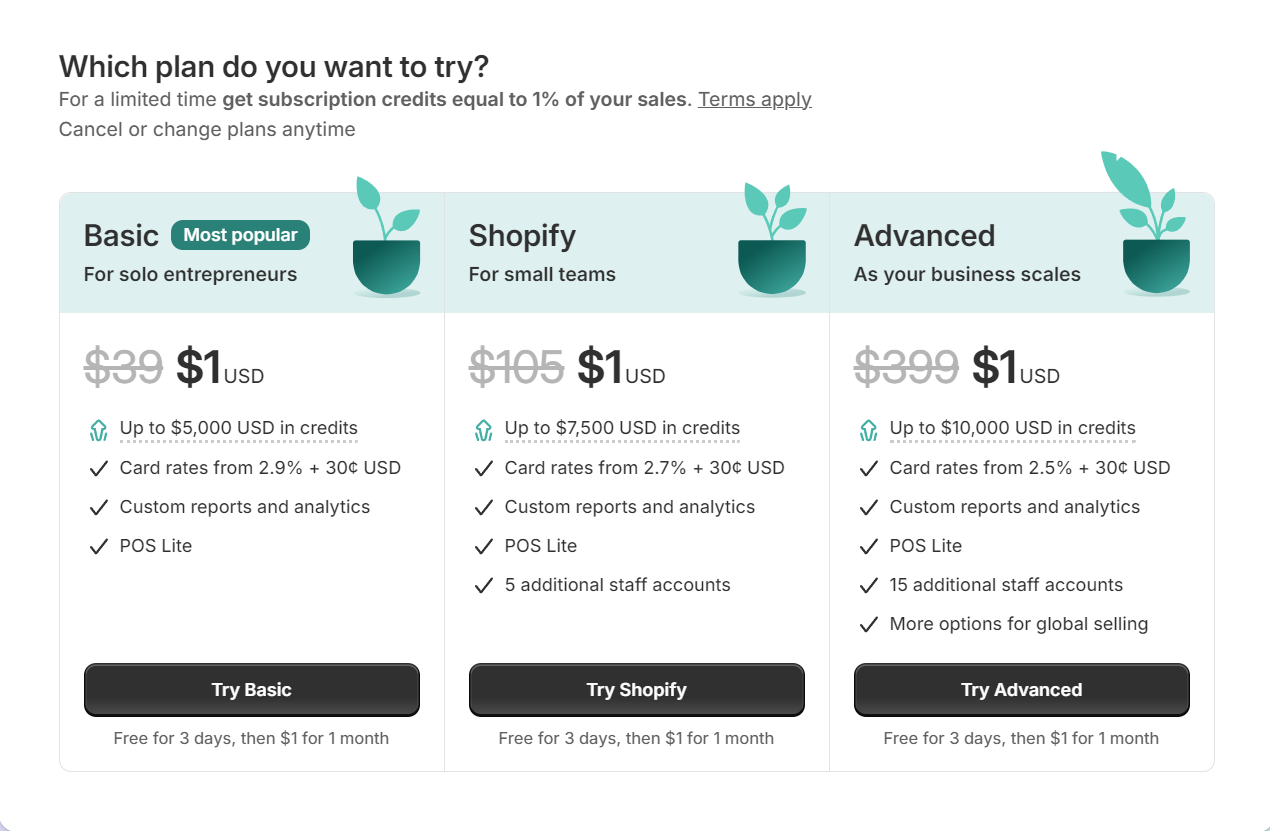
The next page further encouraged me to sign up for a month-to-month plan. In fact, I couldn’t find any way to sign up for an annual plan during this process. I had to skip this step, log into my account and click Select a Plan. This directed me to a new purchase page where I was able to buy an annual plan.
Reaching this page was convoluted and frustrating, but I appreciated the complete outline of the charges here. You’ll see when the first dollar comes out of your account and when the full payment will be made so you can plan accordingly. There are also no upsells or hidden fees to contend with here.
Account management
Logging into Shopify opens your shop dashboard, with account management accessed through a user icon in the top right corner. I dislike how small this user icon is, but many sites (even Google) store account management menus in this area, so finding it is fairly intuitive.
The account dashboard is clearly laid out, with areas for modifying your name, connecting social logins like Google or Facebook and enabling security features like two-factor authentication.
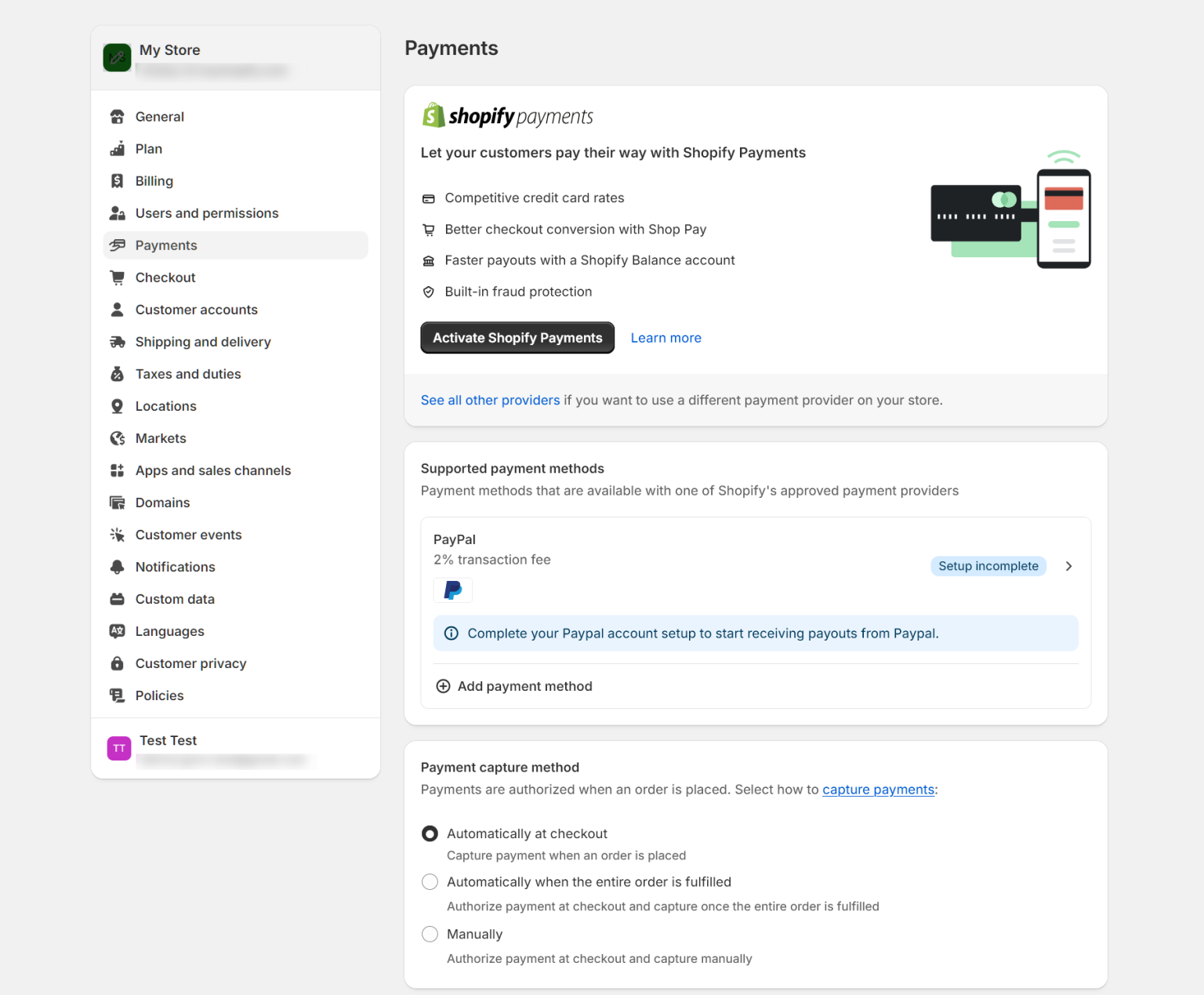
Unfortunately, you won’t find your billing information here. There’s no clear link to your billing area in the store dashboard either. I only found these details when I went to set up Shopify Payments, which opened a box where you can manage the financial and logistical details of your store’s operation.
Build Your Store with Shopify®
Store setup
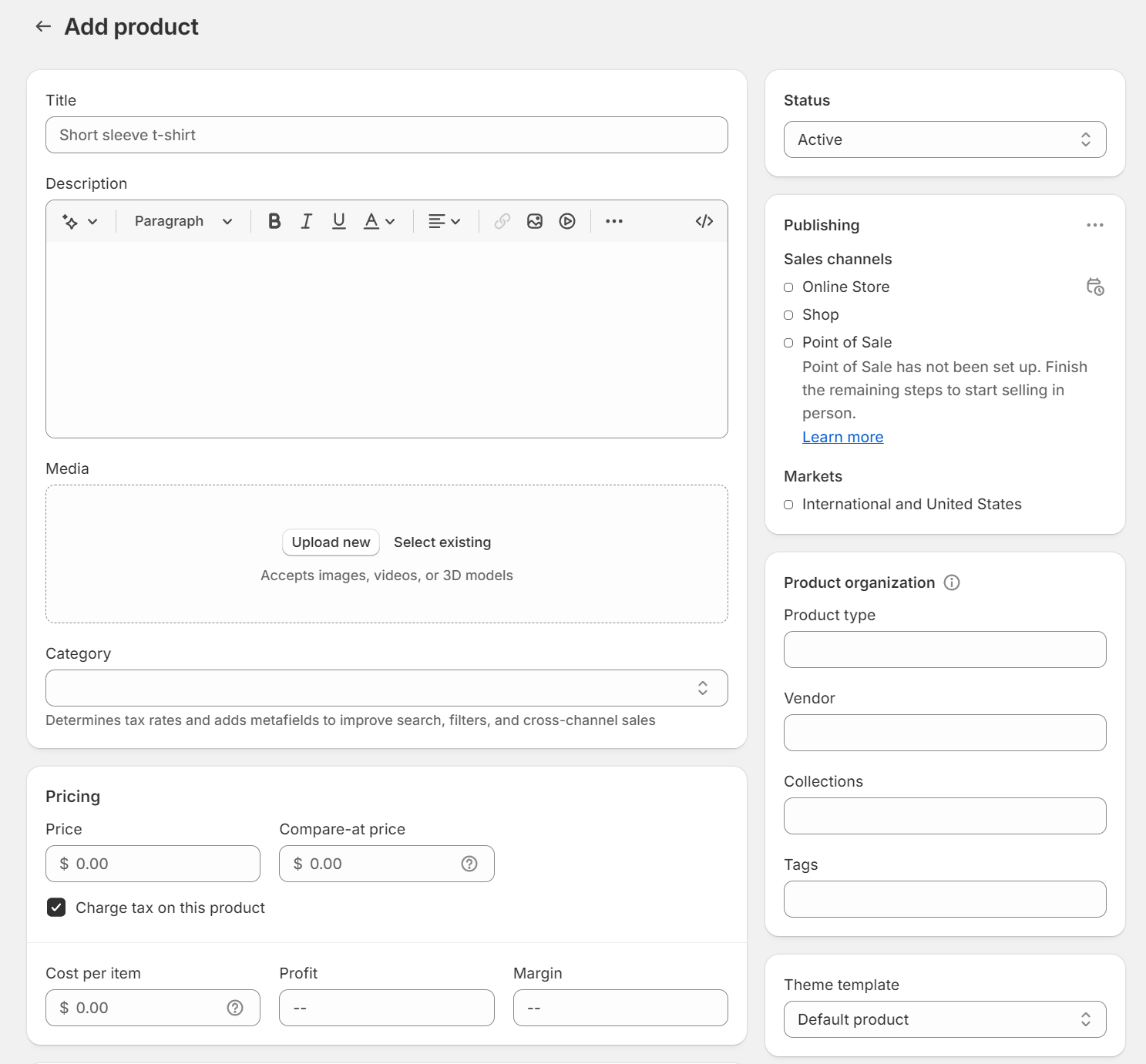
Like the rest of the Shopify process, store setup is counterintuitive, directing you to import or create your products before you choose a site template. The good news is that product creation is straightforward, with clearly labeled areas for your product name, description, price and inventory information. You can also add the country of your inventory locations and Harmonized System code to get Shopify to automatically calculate customs charges for each sale.
Next, you’ll be prompted to design your site. There are two options here: Generate custom theme and Browse premade themes. I selected a premade theme and jumped into the site editor.
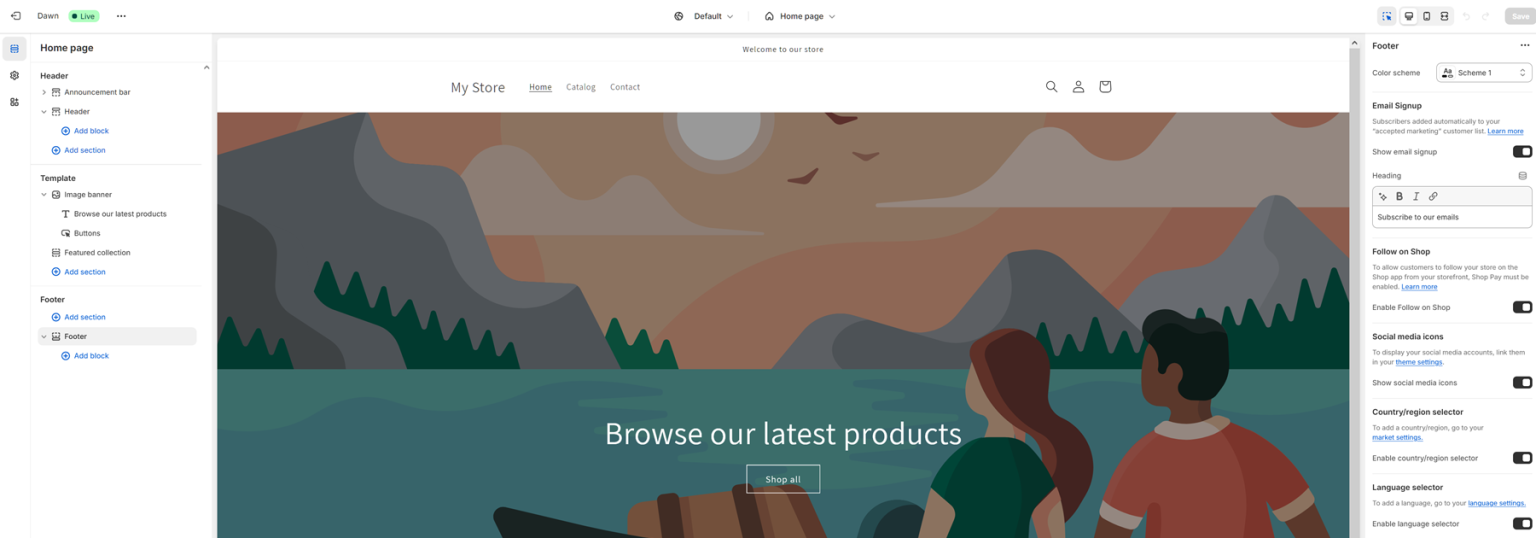
At last, I found a Shopify tool that was easy to use. The left sidebar lists every section of your site. When you click on a section, the editor brings you to the relevant area on the page. Block settings appear in the right sidebar, giving you total control over the design. Unlike many other website builders, Shopify also allows you to customize CSS if you learn code and styling (or hire a developer) later on.
You can also use AI to generate new text by selecting any text block and clicking the diamond icon above the text box. Shopify’s AI tools cannot create images at this time.
You can add sections through the right sidebar or by clicking on the area of the store page you want to add content to. There are a variety of e-commerce blocks and some content blocks (like “image and text”) for use in areas like your “About” page.
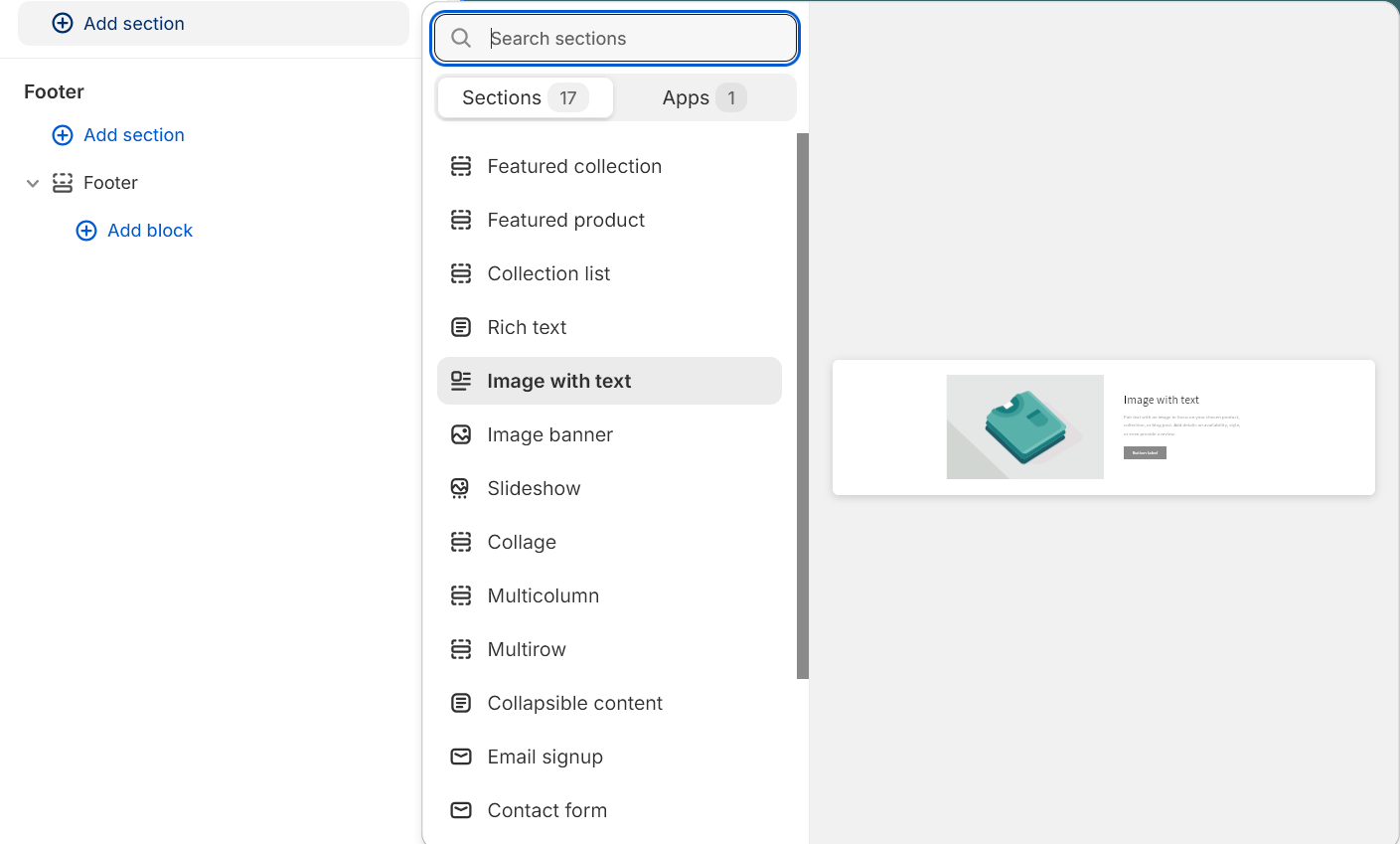
Moving content around is similarly straightforward: Click on a block title in the left sidebar and drag it up or down in the list. The only downside is that you can’t change the width of a block to fit multiple blocks in one section of the page.
The final upside to the Shopify store editor is the Preview tool in the top right corner. This makes it easy to switch between desktop, tablet and mobile views so you can see how your site will appear on various devices. However, you won’t get the extensive mobile editing options offered by Wix.
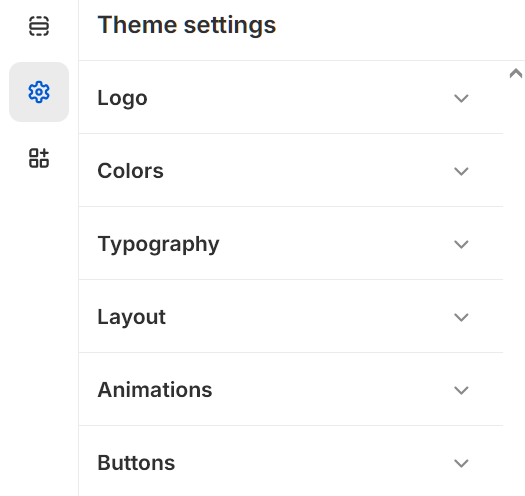
Typography, colors and other aspects of your site’s overall appearance can be modified by clicking the gear icon in the sidebar. I was also pleased to see marketing tools here, like the ability to create a brand statement and add social media links for the website footer.
Build Your Store with Shopify®
Overall ease of use: Pretty simple after a cumbersome signup process
Shopify frustrated me at the beginning with a convoluted signup process and hidden billing settings. Product and store setup — the things you’ll spend the most time on — were easier, redeeming Shopify and earning it a 7/10 ease of use ranking.
E-commerce tools let you manage inventory, shipping and more
Shopify comes with built-in e-commerce tools for things like inventory management, tax calculation and shipping. I explored these tools as much as possible without selling any products of my own.
The inventory management area lists all of your products in an easy-to-understand table where you can view the number of products you have on hand and how many unfulfilled orders there are for each item. Numbers are adjusted as orders are made through your store, and you can also manually adjust them.
The shipping area is similarly easy to navigate, with clear instructions for setting up shipping options and rates for various locations. You can create preset package sizes (like a 3-pound box measuring 12 by 12 by 12 inches) which are used to calculate the exact shipping cost for each purchase during checkout. You can also buy shipping labels in bulk from Shopify.
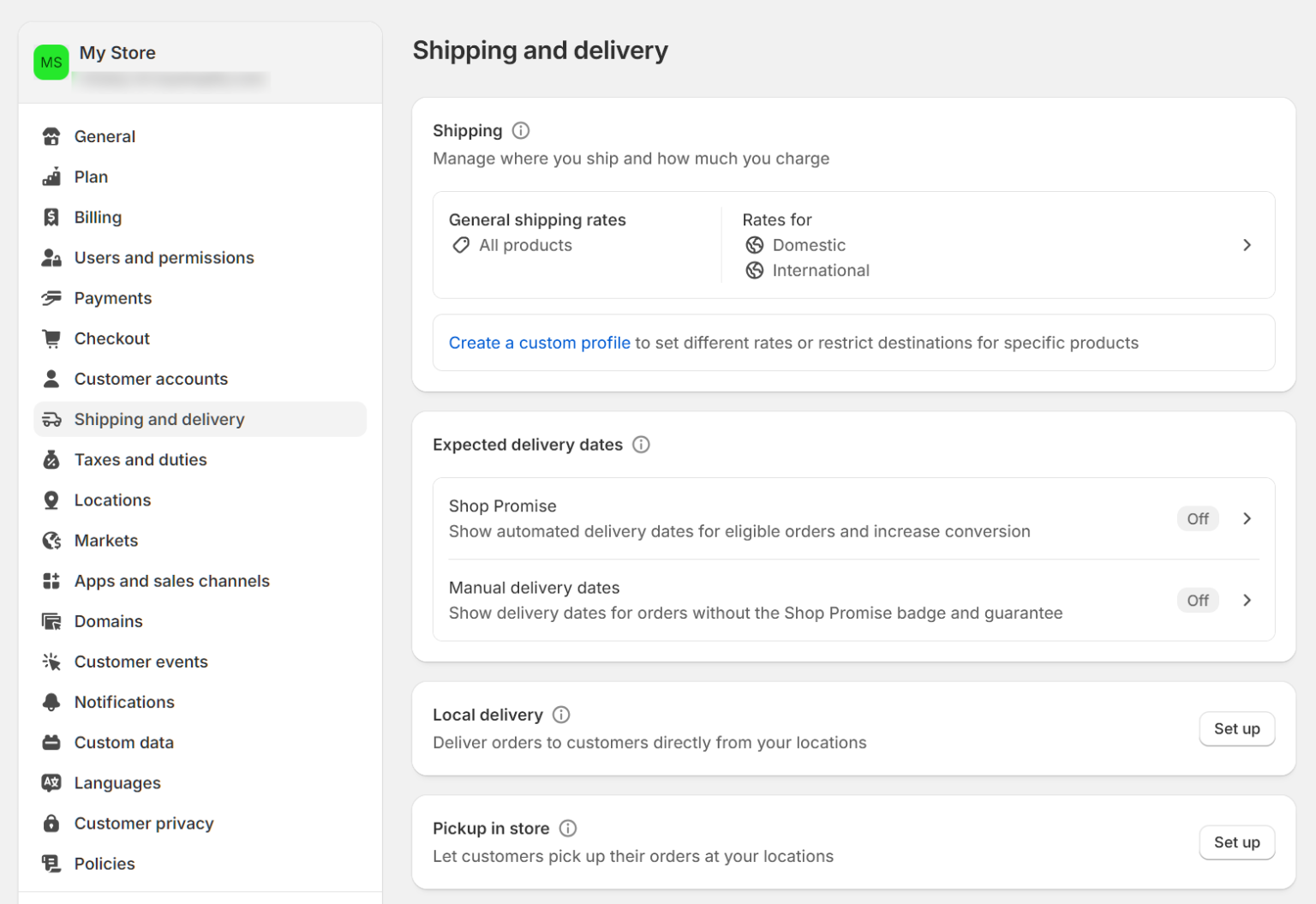
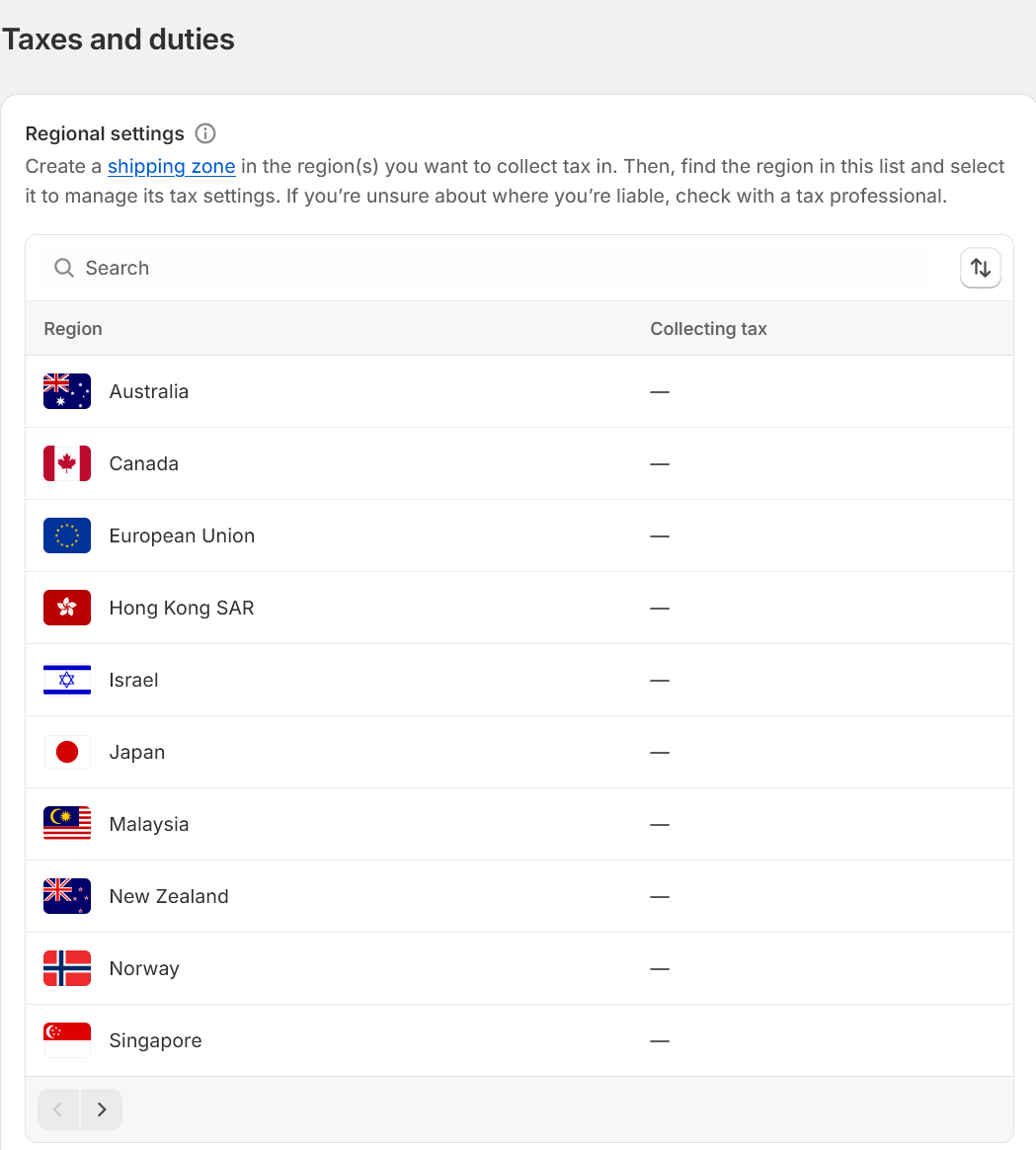
As for taxes, Shopify lets you enable GST and other automated tax calculations for products sold in 15 countries, including the US, Canada and the UK. You can choose to include these taxes in the prices displayed on your store or let them be calculated during checkout. Shopify automatically builds reports detailing the taxes you’ve collected to simplify financial management.
Shopify performance: Blazing-fast and reliable
I spent a week testing my Shopify site for two essential aspects of site performance, uptime and site speed.
- Uptime: The percentage of time your site spends online. Uptime matters because people who can’t access your site will often go elsewhere. This can lead to reduced traffic, audience trust and, if you’re building a business website, revenue.
- Site speed: The number of seconds your site takes to load. Site speed matters because people are 32% more likely to leave your site after only viewing one page if loading times go from 1 to 3 seconds. This reduces your ability to build a loyal following.
Here are the protocols Shopify uses to ensure fast, reliable server performance.
Build Your Store with Shopify®
Performance tools
Shopify offers a few tools for improving your site speed:
- Content delivery network or CDN: A network of interconnected servers in different physical locations. Site data is stored in all of these servers, allowing visitors’ devices to retrieve information from the server closest to their location. This is often faster than relying on a single server on the other side of the world for data retrieval. You’ll need to manually enable this feature.
- Caching: A specialized data storage technique that helps your devices load websites more quickly. This is done by connecting your site’s data to the CPU, which is faster than the RAM traditionally used for data storage. Some caching tools also store data in your visitors’ browsers so that your site loads faster on repeat visits. Both types of caching are automatically enabled on Shopify.
- Image compression: A method of reducing image file sizes to ensure faster loading times without sacrificing the image’s resolution. Shopify offers image compression tools that you can use before placing images on your site.
- Image lazy load: A protocol that loads images as you encounter them — loading each image as you scroll to the part of the page where that image is located — rather than loading everything right away. You must enable this feature manually.
This is a great range of features compared to other website builders, like Wix and Squarespace, which only offer a CDN and caching.
Uptime
Shopify offers a 99.99% uptime guarantee, meaning your site won’t go down for more than 2 minutes a week. This is higher than the industry-standard 99.9%, which guarantees less than ten minutes of downtime per week. I monitored my test site for one week using Betterstack to find out if Shopify lives up to its above-average uptime guarantee.
Unfortunately, Shopify failed this test in rather spectacular fashion during my first week of testing, with 17 downtime incidents leading to two hours and 10 minutes of downtime. This is almost twice as much downtime than the hour and 10 minutes of downtime I experienced during my InMotion Hosting review, which is the most downtime I had experienced with any other web host.
This failure shocked me, especially since there were no recorded outages on the Shopify status page. I suspected the issue might be with my site, not the servers, and reached out to customer service. They confirmed that my issue was site-specific and caused by a failure to properly connect to the server. The rep reset the connection for me and I started a new week of uptime monitoring. This time I had zero downtime, suggesting that Shopify does in fact live up to its 99.99% uptime guarantee — and might even exceed it. This also puts Shopify on even footing with other popular website builder companies like Wix and Squarespace.
Site speed
I spent five days performing speed tests at different times of day to see if Shopify sites regularly load within the expert-recommended timeframe of three seconds or less. I used WebPageTest to simulate the experiences of users in countries all over the world, then compiled the data from those tests to establish the following average site speeds (remember, lower numbers are better):
| US | UK | Germany | India | Dubai | Australia | |
| Mobile | 2.31 | 2.34 | 2.33 | 2.18 | 1.99 | 2.38 |
| Desktop | 1.2 | 1.07 | 1.12 | 1.16 | 1.26 | 1.26 |
These numbers don’t accurately represent everyone’s experiences — there are many other countries and speed may vary based on a user’s device and internet plan — but they’re robust enough to represent a high percentage of users’ experiences.
Based on these numbers, the average site speeds for Shopify are:
- 2.25 seconds on mobile
- 1.17 seconds on desktop
This leads to an overall average of 1.71 seconds, the fastest average site speed of any web host I’ve tested. In fact, it’s much quicker than the next-fastest host, GoDaddy, which had an average site speed of 2.29 seconds.
Overall
Shopify’s excellent uptime and high-speed servers give Shopify a 9/10 performance ranking. This is higher than the 9/10 ranking of Wix and the 8/10 ranking of Squarespace.
Shopify security
Shopify offers several layers of security to protect your site and your customers’ data in compliance with PCI Security Standards, a set of globally-recognized data security standards used to protect digital payments. The most important of these protocols are:
- Secure socket layer — SSL — certification: A protocol that protects data sent to and from your site — like customers’ payment information — by encrypting it into a language only computers can understand. SSL certification signals that your site is safe, which can prevent it from being blacklisted by VPNs and browsers. Google also considers SSL certification in its rankings, making it more difficult to rank well if your site lacks this essential feature.
- Firewall: Filtration software that analyzes traffic to your site and tries to prevent malicious traffic, malware and other threats from accessing it.
- Distributed denial of service — DDoS — protection: Distributed denial of service attacks flood your site with malicious traffic to overwhelm your server. Shopify uses automated protocols to identify these attacks and stop them before they can shut your site down.
- 24/7 security monitoring: The Shopify security team constantly monitors servers to mitigate threats and vulnerabilities as they occur.
- Account security: Shopify lets you set up two-factor authentication or a passkey to make it more difficult for malicious users to access your account.
These security measures are similar to what you’ll get from other popular website builders like Wix and Squarespace. Shopify also has e-commerce specific security features, like fraud prevention protocols, fraud analysis, proxy detection (to identify customers using proxy services or IP addresses), automated dispute management and card testing protection. Shopify Payments users also get Shopify Protect, which protects your store from fraudulent chargebacks. All together, these security protocols earn Shopify a 10/10 security ranking.
Shopify customer support
As an e-commerce store owner, issues with your site can cost you hundreds or even thousands of dollars if they’re not resolved quickly. This makes it important to have 24/7 access to fast, helpful customer support through your preferred method of communication — live chat, email or phone. I tested Shopify’s knowledge base and live chat to see how it lives up to these standards.
Knowledge base
The Shopify Help Center provides extensive tutorials for various aspects of store setup, management and troubleshooting. This help center has both a search bar and several content categories so you can quickly find the tutorial you need. You’ll also see a notification at the top of the page if there are any current issues with Shopify servers.
 Reigniting Your Passion for Charitable Giving: What to Do When the Flame Flickers
 Anticipating Savings: How a Landmark Court Case Could Make Home Sellers’ Costs More Affordable
 5 Imperative Facts to Acknowledge Before You Opt for Debt Settlement
 Save Money During the Winter Months with These Easy Tips
 Credit Rating: How To Improve Credit Rating?
 Top Property Investment Tips

 Shopify Review: The Best Website Builder for E-Commerce
 Reigniting Your Passion for Charitable Giving: What to Do When the Flame Flickers
 Anticipating Savings: How a Landmark Court Case Could Make Home Sellers’ Costs More Affordable
 5 Imperative Facts to Acknowledge Before You Opt for Debt Settlement
 Save Money During the Winter Months with These Easy Tips
 Credit Rating: How To Improve Credit Rating?
 Important Ways You Can Relieve the Financial Pressures of Debt
 Revolutionizing Food Delivery: HSA and FSA Cards Welcomed by DoorDash and Instacart
 Experian’s $650K Fine: Unpacking the Consequences of Spamming Violations
 Unveiling a Tax-Free Aid: How Employer Student Loan Repayment Assistance Eases the Financial Burden
 Empower Your Finances: A Guide to Free Credit Report Monitoring
 Generational Perspectives: When Should Kids Start Paying Their Own Bills?
 What is Your Credit Utilization Ratio – Read Here
 Navigating Retirement Roads: The Intersection of Student Loan Payments